
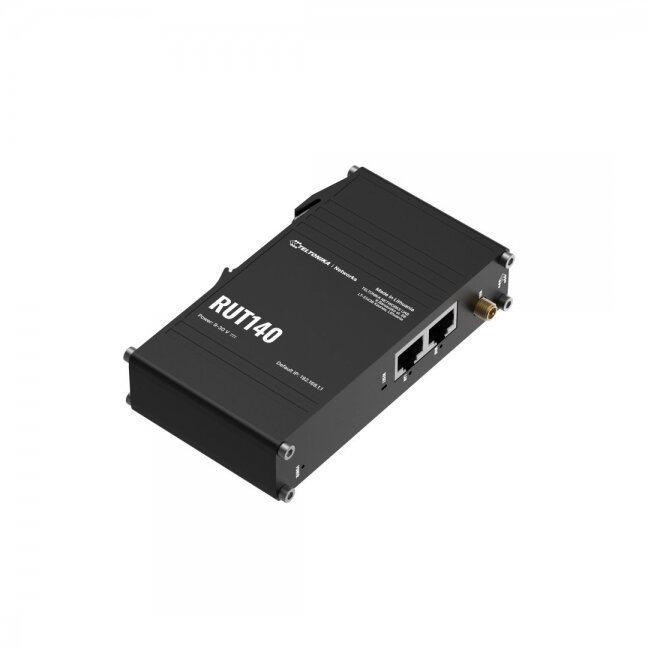
Router Teltonika RUT140
ManufacturerTeltonika-
- General
- Wireless mode802.11b/g/n (Wi-Fi 4), Access Point (AP), Station (STA)
- Wi-Fi securityWPA2-Enterprise: PEAP, WPA2-PSK, WPA-EAP, WPA-PSK, WPA3-SAE, WPA3-EAP, OWE; AES-CCMP, TKIP, Auto-cipher modes, client separation, EAP-TLS with PKCS#12 certificates, disable auto-reconnect, 802.11w Protected Management Frames (PMF)
- SSID/ESSIDESSID stealth mode
- Wi-Fi usersUp to 50 simultaneous connections
- Wireless Connectivity FeaturesWireless mesh (802.11s), fast roaming (802.11r), Relayd, BSS transition management (802.11v), radio resource measurement (802.11k)
- Wireless MAC filterAllowlist, blocklist
- Wireless QR code generatorOnce scanned, a user will automatically enter your network without needing to input login information
- TravelMateForward Wi-Fi hotspot landing page to a subsequent connected device
- WAN1 x WAN port 10/100 Mbps, compliance with IEEE 802.3, IEEE 802.3u, 802.3az standards, supports auto MDI/MDIX crossover
- LAN1 x LAN port, 10/100 Mbps, compliance with IEEE 802.3, IEEE 802.3u, 802.3az standards, supports auto MDI/MDIX crossover
- RoutingStatic routing, Dynamic routing (BGP, OSPF v2, RIP v1/v2, EIGRP, NHRP), Policy based routing
- Network protocolsTCP, UDP, IPv4, IPv6, ICMP, NTP, DNS, HTTP, HTTPS, FTP, SMTP, SSL v3, TLS, ARP, VRRP, PPP, PPPoE, UPNP, SSH, DHCP, Telnet, SMPP, SNMP, MQTT, Wake On Lan (WOL), VXLAN
- VoIP passthrough supportH.323 and SIP-alg protocol NAT helpers, allowing proper routing of VoIP packets
- Connection monitoringPing Reboot, Wget Reboot, Periodic Reboot, LCP and ICMP for link inspection
- FirewallPort forward, traffic rules, custom rules, TTL target customization
- Firewall status pageView all your Firewall statistics, rules, and rule counters
- Ports managementView device ports, enable and disable each of them, turn auto-configuration on or off, change their transmission speed, and so on
- Network topologyVisual representation of your network, showing which devices are connected to which other devices
- DHCPStatic and dynamic IP allocation, DHCP relay, DHCP server configuration, status, static leases: MAC with wildcards
- QoS / Smart Queue Management (SQM)Traffic priority queuing by source/destination, service, protocol or port, WMM, 802.11e
- DDNSSupported >25 service providers, others can be configured manually
- DNS over HTTPSDNS over HTTPS proxy enables secure DNS resolution by routing DNS queries over HTTPS
- Network backupWi-Fi WAN, VRRP, Wired options, each of which can be used as an automatic Failover
- Load balancingBalance Internet traffic over multiple WAN connections
- HotspotCaptive portal (hotspot), internal/external Radius server, Radius MAC authentication, SMS authorization, SSO authentication, internal/external landing page, walled garden, user scripts, URL parameters, user groups, individual user or group limitations, user management, 9 default customizable themes and optionality to upload and download customized hotspot themes
- SSHFSPossibility to mount remote file system via SSH protocol
- Traffic ManagementReal-time monitoring, wireless signal charts, traffic usage history
- AuthenticationPre-shared key, digital certificates, X.509 certificates, TACACS+, Internal & External RADIUS users authentication, IP & login attempts block, time-based login blocking, built-in random password generator
- FirewallPreconfigured firewall rules can be enabled via WebUI, unlimited firewall configuration via CLI, DMZ, NAT, NAT-T, NAT64
- Attack preventionDDOS prevention (SYN flood protection, SSH attack prevention, HTTP/HTTPS attack prevention), port scan prevention (SYN-FIN, SYN-RST, X-mas, NULL flags, FIN scan attacks)
- VLANPort and tag-based VLAN separation
- WEB filterBlacklist for blocking out unwanted websites, Whitelist for specifying allowed sites only
- Access controlFlexible access control of SSH, Web interface, CLI and Telnet
- SSL certificate generationLet's Encrypt and SCEP certificate generation methods
- 802.1xPort-based network access control server
- OpenVPNMultiple clients and a server can run simultaneously, 27 encryption methods
- OpenVPN Encryption27 encryption methods including DES-CBC 64, RC2-CBC 128, AES-128-GCM 128, AES-256-CBC 256, etc.
- IPsecXFRM, IKEv1, IKEv2, 14 encryption methods for IPsec (3DES, AES128, AES256, AES256GCM16, etc.)
- GREGRE tunnel, GRE tunnel over IPsec support
- PPTP, L2TPClient/Server instances can run simultaneously, L2TPv3, L2TP over IPsec support
- StunnelProxy designed to add TLS encryption functionality to existing clients and servers without any changes in the program’s code
- DMVPNMethod of building scalable IPsec VPNs, Phase 2 and Phase 3 and Dual Hub support
- SSTPSSTP client instance support
- ZeroTierZeroTier VPN client support
- WireGuardWireGuard VPN client and server support
- TincTinc offers encryption, authentication and compression in its tunnels. Client and server support.
- OPC UASupported modes: Client, Server
- MODBUSSupported modes: Server, Client; Supported connection types: TCP
- Custom registersMODBUS TCP custom register block requests, which read/write to a file inside the router
- Supported data formats8-bit: INT, UINT; 16-bit: INT, UINT (MSB or LSB first); 32-bit: float, INT, UINT (ABCD (big-endian), DCBA (little-endian), CDAB, BADC), HEX, ASCII
- ProtocolHTTP(S), MQTT, Azure MQTT
- Data to serverExtract parameters from multiple sources and different protocols, and send them all to a single server; Custom LUA scripting
- MQTT GatewayModbus MQTT Gateway allows sending commands and receiving data from MODBUS Server through MQTT broker
- Monitoring & ManagementWEB UI: HTTP/HTTPS, status, configuration, FW update, CLI, troubleshoot, event log, firmware update notifications
- FOTAFirmware update from server, automatic notification
- SSHSSH (v1, v2)
- EmailReceive email message status alerts of various services
- TR-069Supported TR-069 clients such as OpenACS, EasyCwmp, ACSLite, GenieACS, FreeACS, LibCWMP, and others
- MQTTMQTT Broker, MQTT publisher
- SNMPSNMP (v1, v2, v3), SNMP Trap, Brute force protection
- JSON-RPCManagement API over HTTP/HTTPS
- RMSTeltonika Remote Management System (RMS)
- CPUMediatek, 580 MHz, MIPS 24KEc
- RAM128 MB, DDR2
- FLASH storage16 MB serial NOR flash
- Operating systemRutOS (OpenWrt based Linux OS)
- Supported languagesBusybox shell, Lua, C, C++
- Power Connector3-pos plugable terminal block
- Input voltage range9-30 VDC, reverse polarity protection, surge protection >31 VDC 10us max
- PoE (passive)Passive PoE over spare pairs, 9 - 30 VDC
- Power consumptionIdle: < 1 W / Max: < 2 W
- Ethernet2 x RJ45 ports, 10/100 Mbps
- Status LEDs1 x WAN type LED, 1 x LAN type LED, 1 x Power LED
- Power1 x 3-pin power connector
- Antennas1 x RP-SMA for Wi-Fi
- ResetReboot/User default reset/Factory reset button
- Casing materialAluminium housing
- Dimensions113.10 x 25 x 68.6 mm
- Weight142.3 g
- Mounting optionsIntegrated DIN rail bracket, wall mount, flat surface (additional kit needed)
- Operating temperature-40 °C to 75 °C
- Operating humidity10% to 90% non-condensing
- Ingress Protection RatingIP30
- Regulatory approvalsCE, UKCA, RCM, FCC, IC, CB, WEEE, RoHS, REACH
- Video, audio, intrusion and access control systems
- Electrical Equipment and Power Supplies
- Network Equipment and WiFi
- Cables and Wires
- Tools and Accessories
- Smart Technology
- Nursing and Healthcare Systems
Products catalog
-
Video, audio, intrusion and access control systems
- IP video surveillance
- Analog video surveillance
- Intrusion systems
- Fire
- Access Control
- Intercom
- Speakers
- Electrical Equipment and Power Supplies
- Network Equipment and WiFi
- Cables and Wires
- Tools and Accessories
- Smart Technology
- Nursing and Healthcare Systems

E-shop
Rass-security systems. Company code: 305706724 VAT number: LT100013849613. Panerių g. 64, LT-03160, Vilnius, Vilniaus m. sav., LITHUANIA. Phone: +37064575015.
© 2026 Rass-security systems. Without Rass-security systems confirmation any use or copying of site content is prohibited.
Router Teltonika RUT140
Add to cart -